Sunday, 13 March 2016

Unsupported major.minor version 51.0 - ODI Install Error


Well I am a huge fan of the Java programming language. I have done a fair bit of coding in C in my college days and although it is a beautiful programming language, once you exceed a certain amount of lines of code, you are going to start experiencing issues because of the sheer volume of the program size. And if you get a segmentation fault in C, you are done for the day. You will spend the whole day putting printf statements everywhere just to identify why things got messed up. I have been there, done that. The advantage of Java was that it came up with a lot of cool features being an object oriented language and made life easy for programmers like me. I particularly like exception handling since it made handling runtime exceptions easy to manage. But yes, as time passed, Java is now so huge that at times you do get frustrated when you meet some errors that make no sense whatsoever.

On Monday I decided to install ODI on my laptop since I wanted to have a look at it and do some messing around with it. Oracle has made it easy to download and do install. So I went ahead and downloaded all the necessary files. I also downloaded the environment setup files just to be able to do the installation of that as well. Now once I finished the file downloads, which were jar files, I ran this simple command to run the jar files.


And as soon as I ran it, I got an error that says “Unsupported major.minor version 51.0


Now, the catch is that this exception although it gives a lot of information, misses out one crucial thing, it does not say exactly what the problem is.

So, I turned to Google and found that this issue is because of mismatch of the JRE environment that is used for compiling the jar file. Since I was using JDK 1.6, it gave an error since the jar files we compiled for JRE 1.7 onwards.

Next step, uninstall the JDK 1.6 and install either 1.7 or 1.8. So back to the inter web downloading the files and installing the necessary software and configuring them.

Again I tried running it, and again the same issue. Now it started getting on my nerves since I had already done the uninstall and I had installed all the necessary versions of JDK…

Also, running java –version command gives that I have 1.8 installed and still it is not happening…

Then I happened to look at the folder from which I was running the java command… It still pointed to 1.6…Apparently, even if I do the uninstall for the JDK 1.6 the folder still remained for some reason…

I changed the folder to 1.8, ran the same command and voila, it started to run…


The thing to realize after this mammoth syntax check exercise is fairly simple:-

  • No matter what exception you catch, it should be explained in a simple way. I am still trying to get my head around what is major and minor and what is 51.0 in the exception…Something as simple as “JRE version mismatch not compatible” would have worked just fine
  • Exceptions are written to handle runtime exceptions and generally, we will not have access to the code structure… So no matter if I know which line is affected, without access to the source code, it is still Greek and Latin to me…
Still got it to work… Another good day comes to an end…

Thursday, 10 March 2016

Hyperion BSO Level 0 data analysis


In this blog, I am going to talk about the Level 0 data export for Hyperion Essbase BSO application and some cool things that I found out about them(usually by messing with them). So I created a BSO application with four dimensions as shown in the below snapshot.

 
The members in the account dimension is as shown in the below snapshot. 


The members in Period dimension is as shown in the below snapshot.

 
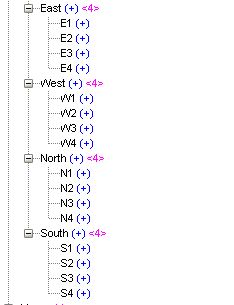
The members of Entity dimensions are split into the four co-ordinates as shown in the below snapshot.

The Year dimension is as shown in the below snapshot.


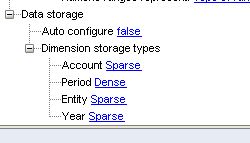
This is the dense-sparse settings for the application that I have kept for the time being. So I have kept Account as dense and Entity, Year and Period as sparse dimension.


Now, I loaded some dummy data using SmartView into the Essbase application BSOSamp. ( BSOSamp is my Sample.Basic. The name has a nice ring to it)


Once the data has been loaded into the system, I run a level-0 data export for the application.


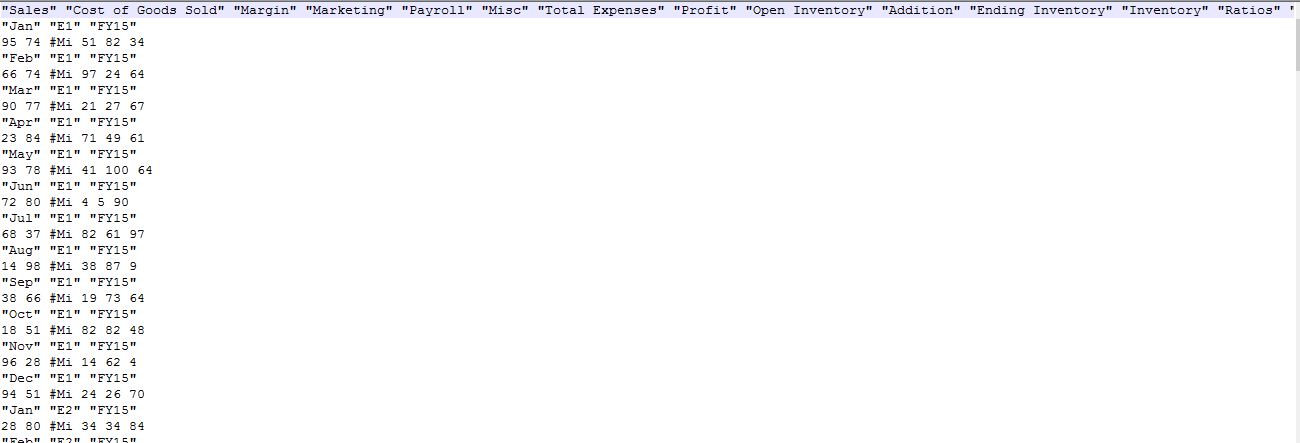
The file that is exported is as shown in the below snapshot.

 
Now, let us analyze the file structure… We know that Level-0 data loads fast into an Essbase application. The reason for this can be understood by understanding the format of the level-0 data export.

The first line has the dense dimension listed. So we have Account dimension members spread on the first line. It is curious to note that though we specified the level 0 data, if you closely observe the first line, you have the upper level members like Margin, Profit, Total expenses and so on from Account dimension also listed in the export. This is because this export is mimicking the internal block structure of the dense dimension. Since we have just one dense dimension, the data block is a single array of all members of Account dimension.

The Second line of the export represents the index entry of “Jan” -> “E1” -> “FY15”

The third line has the data for the index entry. This data can be mapped one-to-one to the first line. So the first column value is the value of Sales, the second value is the value of Cost of Goods Sold and so on.
Now, I decided to change the dense sparse settings a bit as shown in the below snapshot.

 
I made the Account and Period dimension dense and Entity and Year are sparse as before.

I now wanted to see if the file import will fail because the dense sparse settings have been changed. I loaded the level-0 data extract and ran the import and it completed successfully.


I exported the level-0 data now from the system once again and the format of the export is as follows:-

 
Now in this export, the Period dimension is on the first line since Period was tagged as Dense.

The second line has the index entry of “E1” -> “FY15”

The third line onwards we have the Account dimension level-0 members in the format of the data block.

I changed the dense sparse settings once again and tagged Account as a sparse dimension and ran the data import once again.  This time also the file imported successfully.


So the findings that I have come to is as follows:-


  • The export is highly optimized. This is basically done by using a technique similar to what is used in video encoding. (Movies are basically still images that are flashed at a rate of 24 plus still images per second. Due to persistence of vision, we get an illusion of a moving image. It is actually quite cool. I remember in my initial training days in Java, we had designed a system that refreshed images at a high rate and we had shown a rocket launch. It was pretty basic but at that time it felt awesome to design.)  
  • The export needs just sufficient information of what changes line-by-line and it will map the data as per the first line. So long as the members are same, dense and sparse setting will not affect the data import.
  • The first dense dimension needs to map all the dimension members. If you see, the first line of the level-0 exports, we basically have the IDescendants of one of the dense dimension.
  • The data export is compact. You can have all the information in the system compressed and optimized, so it loads fast.

First Look - Enterprise Planning and Budgeting Cloud Service


Last week I got the chance of attending the Oracle Partner Webcast of Enterprise Planning and Budgeting Cloud Service and I am sure surprised at some of the features that Oracle has introduced in this version. I would basically be going over the things that I found to be really cool in the application. Now since this is basically a presentation that I attended, I could not get through a lot of things with my hands-on (after all once you get your hands on something is only when you will actually understand things)

The first thing that I saw in the demo was that the entire look-and-feel of EPBCS is made to be mobile device friendly. There are tabs for most of the application like Revenue, Expense, Balance Sheet and Cash flow. Whenever you click on an application, it will immediately open a dashboard that shows the overall application status and then you can zoom in to the detailed level reports that you have.

Given the look-and-feel of the application, it looks like it has been designed for mobile applications and tablets and then for computers and desktops. EPBCS is built on top of HTML5 and it surely looks like it has been designed mostly for on-the-go kind of devices.

The other feature of EPBCS is that they plan to integrate the entire planning process for an organization under a single window. So it is possible that the organizational budgets, departmental budgets and the individual projects can all be viewed under a single window so as to help the organizations implement a single window for all their planning and budgeting needs.

The other thing that I was really impressed on in the demo is the strategic workflow module. This module is basically designed to integrate the long term HR planning with the corporate finance. Most of the big organizations will have the following streams who handle the HR planning:-

  • ·         Human Resources.
  • ·         Business Unit.
  • ·         Line-of-Business.


Now the problem is that each of these act in their own silos and there is generally very less interaction among them. So you can have the HR which handles recruitment not in sync with the Business Unit that handles the daily grind of resources allocation and projects which in turn is not in sync with the LOB that has the visibility on the general trend in the business landscape.

Now the way Strategic Workforce Module was presented was such that, it will allow for this integration among these different groups of users to happen so that we have a single view of data in their specific format, which is impressive since this is a genuine problem that they are trying to solve.

Overall, EPBCS came up with some very interesting features and it would be something to look out to when it releases in a couple of months. I am still to type out most of the transcript so I think there will be more things to add later on, but for today I have jotted down the things that I found to be amazing in EPBCS.

Monday, 29 February 2016

Hyperion Essbase/Planning Outline Exfiltrator

Well, this is the first look at the Hyperion Essbase Outline Exfiltrator( I think I was watching some war movie or playing a game when I came up with this name...But you have to pardon me, these are a few luxuries that I have in life .... Coming up with weird names for simple things... By the way, the Essbase Log File parser will be called "Agamennon" so don't be surprised :P )

This is an alpha version which means that the code is bad, I have not added the bells and whistles, some hard coding will be there, but it works and it works beautifully...

This is the sample application outline that I will be extracting for the blog.

It is pretty simple and straight forward... Kind of "Hello World" for Essbase...

The outline extractor looks as follows... Some fields are blacked out, but in later versions I will try to come up with the product as is


I navigate to the application and click the "Extract OTL" node... The screenshot after that is as follows:-


For the demo, I am running the extract all dimensions...I still have to code the extract specific ones.. Then I just hit the submit button...

In the above snapshot, you can choose the directory where you want the hierarchy information to be extracted. I have chosen the "Desktop". The files have the following naming convention:- "Appname-DBName-DimensionName.txt"


The outline information extracted in the files is as follows:-


Since this is an alpha, some things may move here or there, but overall this works...

Do let me know your suggestions for the same...